Posts

Nested if and Multi-Way if-else Statements
Image
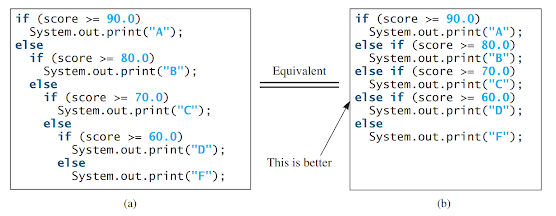
Nested if and Multi-Way if-else Statements:           An if statement can be nested inside another if statement, forming a nested if statement. This allows for more complex decision-making in a program.           In a nested if statement, an if statement is placed inside another if statement. The inner if statement is considered to be nested within the outer if statement. There is no limit to the depth of nesting and an inner if statement can also contain another if statement.           Here is an example of a nested if statement: if (i > k) {     if (j > k)         System.out.println("i and j are greater than k"); } else {     System.out.println("i is less than or equal to k"); }           In this example, the inner if statement ` if (j > k) ` is nested inside the outer if statement ` if (i > k) `. This allows for di...

Numeric Data Types , Operations and Literals

Image
 Numeric Data Types :                     Each data type in Java has a specific range of values associated with it. When you declare a variable or constant, the compiler sets aside memory space based on its data type. Java offers eight primitive data types that cater to numeric values, characters, and Boolean values. In this section, we will focus on introducing numeric data types and the operators used with them.           Table-1 lists the six numeric data types, their ranges, and their storage sizes. Table-1           In Java, there are four types available for representing integers: byte, short, int, and long. It is important to choose the appropriate type based on the range of values your variable needs to hold. For instance, if you know that an integer will always fall within the range of a byte, it is recommended to declare the variable as a byte to optimiz...

Named constants and naming conventions

Image
Named constants:           During the execution of a program, the value of a variable can be altered, whereas a named constant, or simply a constant, represents data that remains unchanged permanently. In our "ComputeArea" program, the constant "PI" retains its value consistently. To avoid repeatedly typing the value "3.14159" for "PI," it is possible to declare a constant for it. The following syntax is used to declare a constant: final datatype CONSTANTNAME = value;           A constant must be declared and initialized in the same statement. The keyword " final " in Java is used to declare a constant. For example, "PI" can be declared as a constant.           The code for the "ComputeAreaWithConstant"   import java.util.Scanner; public class ComputeAreaWithConstant {     public static void main(String[] args) {         final double PI = 3.14159; // Declare a con...

Assignment statements

Image
Assignment statements:             An assignment statement designates a value for a variable. An assignment statement can be used as an expression in Java.           Once you declare a variable, you have the ability to give it a value by utilizing an assignment statement. In Java, the assignment operator is represented by the equal sign (=). The structure for assignment statements follows this syntax: variable = expression;           An expression denotes a computation that involves values, variables, and operators, which, when combined, yield a result. Let's examine the subsequent code as an illustration: int y = 1; // Assign the value 1 to the variable y double radius = 1.0; // Assign the value 1.0 to the variable radius int x = 5 * (3 / 2); // Assign the value of the expression to x x = y + 1; // Assign the sum of y and 1 to x double area = radius * radius * 3.14159; // Compute the area ...

Reading input from console, identifiers and variables

Image
    Reading input from console:           In Java, the standard output device is referred to as  System.out , while the standard input device is referred to as System.in. By default, the output device is the display monitor, and the input device is the keyboard. To display information on the console, you can use the println method to output primitive values or strings.           Console input is not directly supported in Java, but you can utilize the Scanner class to create an object that can read input from System.in. The following line of code demonstrates how to create a Scanner object for this purpose:                     Scanner input = new Scanner(System.in);           By using the syntax "new Scanner(System.in)", you instantiate a Scanner object. The line "Scanner input" declares a variable named "input" of type Scann...

Java programming style, documentation and errors

Image
  Programming Style: Programming style refers to the conventions and guidelines followed while writing code. A consistent and readable programming style not only improves code maintainability but also enhances collaboration among developers. Here are some key aspects of programming style: 1. Indentation and Formatting:  Use consistent indentation (e.g., four spaces) to improve code readability. Properly format code by following conventions for line breaks, spacing, and alignment. 2. Naming Conventions:  Choose meaningful and descriptive names for variables, functions, and classes. Use camelCase or snake_case for variable and function names, and capitalize class names (e.g., `myVariable`, `calculate_area()`). 3. Comments:  Include comments to explain the code's logic, clarify complex algorithms, and provide context. Comments should be concise, relevant, and kept up to date. 4. Modularity and Readability:  Break down complex tasks into smaller functions or methods...

Creating, compiling and Executing a simple java program

Image
Creating, compiling and Executing a simple java program:                 Java is a widely used programming language known for its simplicity and platform independence. In this guide, I will walk you through the process of creating, compiling, and executing a simple Java program. Step 1: Set up Java Development Kit (JDK) Before you start writing Java programs, make sure you have the Java Development Kit (JDK) installed on your computer. You can download the latest version of JDK from the official Oracle website and follow the installation instructions for your operating system. Step 2: Choose a Text Editor or Integrated Development Environment (IDE) Next, you need to choose a text editor or an Integrated Development Environment (IDE) to write your Java code. Some popular choices for text editors include Notepad++, Sublime Text, or Visual Studio Code. Alternatively, you can use an IDE such as Eclipse, IntelliJ IDEA, or NetBeans, which provide ...

The Java Language Specification, API, JDK, and IDE

Image
Java Language Specification: The Java Language Specification (JLS) is a document that defines the syntax, semantics, and rules of the Java programming language. It provides a comprehensive guide for developers and compiler writers to understand how Java programs should be written and interpreted. The JLS covers topics such as data types, variables, expressions, control flow, object-oriented programming concepts, exception handling, and more. It serves as a standard reference for ensuring consistent behavior across different Java implementations. Java API: The Java API (Application Programming Interface) is a collection of pre-written classes and interfaces that provide ready-to-use functionality for Java developers. The API is organized into packages, each containing related classes and interfaces. These packages cover a wide range of areas such as input/output operations, networking, GUI programming, database access, multithreading, and many others. By utilizing the Java API, develope...

Popular posts from this blog

Named constants and naming conventions

Numeric Data Types , Operations and Literals

Nested if and Multi-Way if-else Statements