Posts

Showing posts with the label If statements

Nested if and Multi-Way if-else Statements
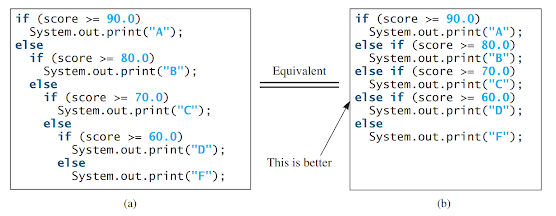
Image
Nested if and Multi-Way if-else Statements:           An if statement can be nested inside another if statement, forming a nested if statement. This allows for more complex decision-making in a program.           In a nested if statement, an if statement is placed inside another if statement. The inner if statement is considered to be nested within the outer if statement. There is no limit to the depth of nesting and an inner if statement can also contain another if statement.           Here is an example of a nested if statement: if (i > k) {     if (j > k)         System.out.println("i and j are greater than k"); } else {     System.out.println("i is less than or equal to k"); }           In this example, the inner if statement ` if (j > k) ` is nested inside the outer if statement ` if (i > k) `. This allows for di...

If statements

Image
 If statements:           An if statement is a programming construct that allows a program to choose between different paths of execution based on a specified condition. In the previous program, a message like "6 + 2 = 7 is false" is displayed. If you want the message to be "6 + 2 = 7 is incorrect," you can use a selection statement to make this minor modification.           In Java, there are several types of selection statements available: one-way if statements , two-way if-else statements, nested if statements, multi-way if-else statements , switch statements, and conditional expressions.           A one-way if statement is used to execute a block of code only if a certain condition is true. The syntax for a one-way if statement is as follows: if (boolean-expression) {     statement(s); }           The flowchart in Figure-1a visually represents how J...

Popular posts from this blog

Named constants and naming conventions

Nested if and Multi-Way if-else Statements

Numeric Data Types , Operations and Literals